AI Coding Tools Compared for Real Development Tasks
AI coding tools excel at different tasks—pick the one matched to your workflow, not your preference.
Most AI coding tool comparisons start in the wrong place. They evaluate the tool, not the task. And that's the root cause of most bad experiences I see teams have.
Development work is not one thing. The tasks you're asking AI to do exist on a wide spectrum, and performance varies dramatically across it. A tool that's exceptionally good at one end can fall completely apart at the other. Think of it like a Swiss Army knife versus a scalpel — both are useful, but you wouldn't perform surgery with a corkscrew.
The rough breakdown looks like this:
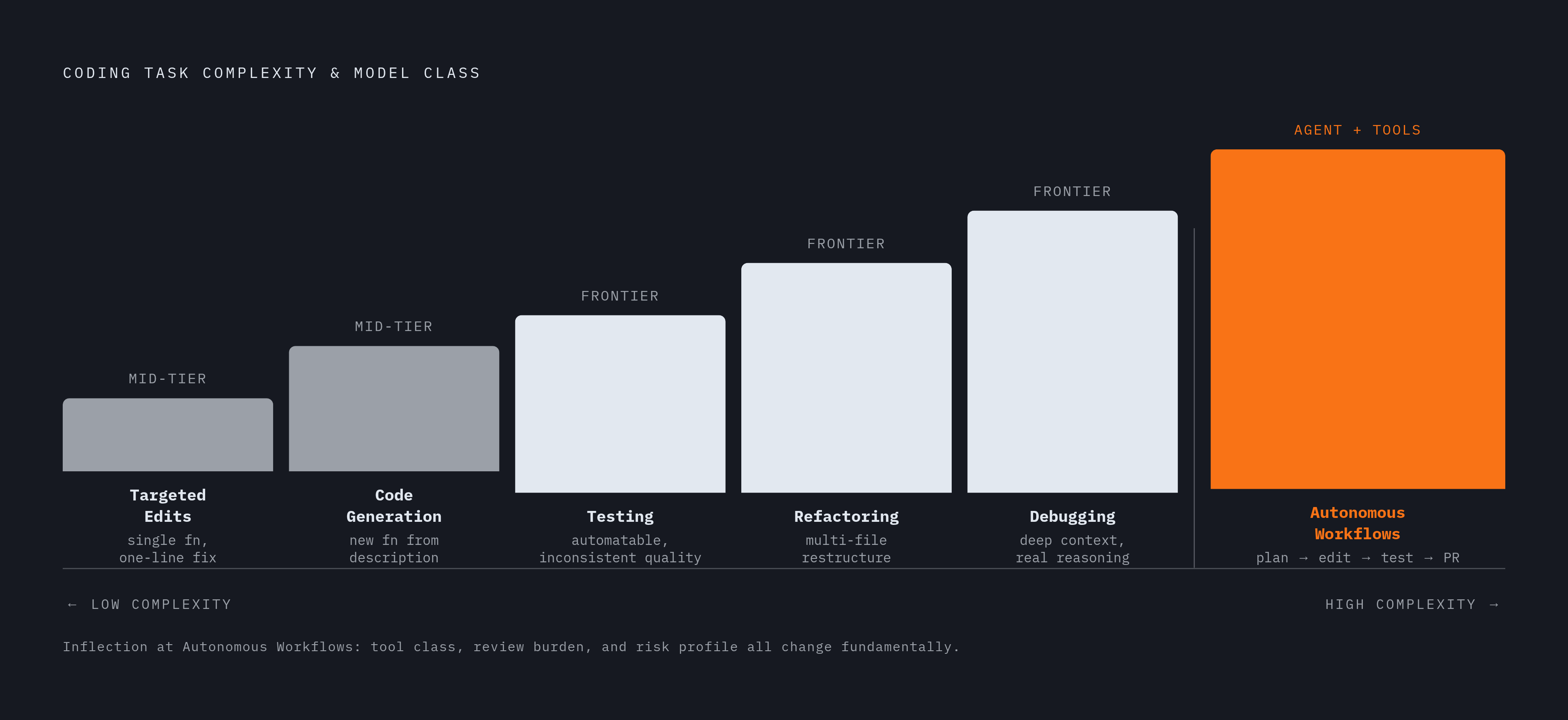
- Targeted edits. Single-function changes, one-line fixes, inline completions. Fast, low context, low risk.
- Code generation. Writing new functions or components from a description. Moderate context, moderate risk.
- Refactoring. Restructuring existing code across multiple files without changing behavior. High context, higher risk.
- Debugging. Reading code to find what's broken, then fixing it. Requires deep context and real reasoning.
- Testing. Generating unit and integration tests, catching regressions. Highly automatable, but quality is inconsistent.
- Autonomous multi-step workflows. Full task delegation. Read an issue, plan a fix, edit files, run tests, open a PR. Minimal human input.
That last category is where things get particularly interesting, and particularly risky. Even a "simple" task can be handled as a targeted edit or handed off to an agent. The right choice depends on how precisely you can define what you want, and how much cleanup you can afford if the output misses.
What AI Tools Actually Do Well on Targeted Edits and Code Generation
The lower end of the spectrum is where AI tools have earned their reputation. Inline completion, small function generation, simple one-file refactors. This is comfortable territory.
Language matters more than people admit. Python and JavaScript have the most training data, and it shows in day-to-day reliability. Rust, Go, and Java are well-supported. Niche languages like Haskell, Elixir, or COBOL? You'll spend more time on prompt engineering to compensate for gaps in model knowledge. Why did the COBOL developer refuse to use AI? Because every suggestion came back and said, "I've fallen and I can't get up."
At this task level, speed and cost matter more than raw accuracy. Mid-tier models deliver somewhere around 80 to 90% of frontier model quality at a fraction of the price and noticeably faster response times. For high-volume targeted work, generating boilerplate, writing docstrings, producing first-draft unit tests, a mid-tier model is often the smarter call than a flagship. You're not leaving that much quality on the table, and you're saving real money.
Teams stumble when they get comfortable at this level, trust the tool, and then hand it something much harder without adjusting their approach. Reliability at the targeted-edit level does not transfer automatically to harder task types.
Where Performance Degrades: Multi-File Refactoring and Debugging at Scale
Once a task touches multiple files, requires holding state across a long context, and asks the model to reason about system-level behavior, model differences stop being theoretical. They start costing you hours.
Two factors predict performance here more than any benchmark number. First is context window utilization. When a model can actually see a large codebase instead of working from a compressed slice, its behavior changes meaningfully. Second is how well the model handles vague or underspecified prompts, which brings me to debugging specifically.
Debugging is where intent-understanding matters most. The developer often knows something is wrong but can't fully articulate what. That's exactly the condition where model differences surface. Some models will thrash on a vague prompt. Others will probe, make reasonable assumptions, and still land close. That's not a small distinction at scale.
Language-specific degradation compounds things here too. A refactor that spans a Python service and a COBOL integration will not behave anything like an all-Python refactor. The model's training data distribution starts to show its seams.
Using a fast mid-tier model on a complex multi-file refactor is the same category of mistake as using a flagship model for autocomplete. Both are mismatches. The cost just shows up in different ways.
The Productivity Evidence for Autonomous Multi-Step Workflows — and Its Complications
Do autonomous agents actually save developer time on complex, end-to-end tasks? This is the most contested question in AI coding right now, and the candid answer is: it depends on conditions most teams don't think to check first.
The headline case is compelling. Tools like Claude Code can handle complete bug-fix workflows, read the issue, analyze files, identify the root cause, implement fixes across multiple files, run tests, and submit a PR. What used to take a few hours can happen in under thirty minutes in well-documented cases.
Then there's a randomized controlled trial from July 2025 that complicates that story. The METR study ran 16 experienced developers through 246 tasks in mature, production codebases. Allowing AI tool use actually increased completion time by 19%. Developers expected a 24% speedup. They got a slowdown.
These were experienced developers, some with years on their specific projects, working on tasks where deep codebase familiarity already existed. A follow-up from METR in early 2026 showed an 18% speedup for those same developers using later tools. Both model improvement and developer skill in deploying agents drove the reversal.
Well-defined, bounded tasks with clear success criteria are where autonomous workflows tend to deliver the biggest gains. A specific bug. A specific migration. Not open-ended architectural work where human judgment is the actual constraint.
How Code Quality Risk Shifts Across the Task Spectrum
Quality risk isn't uniform. It scales with autonomy and scope, and I don't think the industry has fully internalized this yet.
At the targeted-edit level, AI-generated code is easy enough to review quickly. At the autonomous workflow level, review becomes the bottleneck. Analysis of pull requests containing AI-generated code found roughly 1.7 times more issues than in human-written code. Separate telemetry across a large developer population confirms the pattern: AI adoption correlates with more bugs per developer and meaningfully larger PRs. More code, more surface area, more review burden.
That's mostly a workflow problem, not a tool problem. Teams that treat autonomous agent output the same way they treat a one-line targeted edit — minimal review, fast merge — are the ones experiencing the quality degradation the research captures.
For tool selection at the autonomous end of the spectrum, the evaluation criteria have to shift. Does the tool write and run tests before submitting? How observable are its decisions? How easy is its output to review? Those aren't nice-to-haves at this task level. They're the primary selection criteria, full stop.
Model Selection as a Function of Task Type, Not Personal Preference
No single model wins every task type. The useful question is which model's strengths actually match the task in front of you.
For complex autonomous workflows and large refactors, you want strong intent-understanding on vague prompts and solid multi-file reasoning ability. That's where frontier models with strong reasoning benchmarks earn their cost premium.
For large-codebase work where the context window is the actual constraint, cost-performance tradeoffs become more interesting. There are models with massive context windows at roughly 40% of flagship pricing. If the task is context-bottlenecked, the economics of routing to those models are hard to ignore.
For high-volume batch work, refactoring thousands of files, generating documentation, writing automated tests at scale, cost-efficient models that sit a few benchmark points behind proprietary flagships can be the smarter call. The economics win on throughput-oriented work. One hard caveat on some options in this category: data routing through certain jurisdictions is a dealbreaker in regulated environments. Know where your code is going.
For targeted edits and code generation at volume, mid-tier models are the rational default. Frontier quality minus a small fraction of capability, at significantly lower cost and faster response times.
One structural shift worth noting: cost has largely eclipsed raw capability as the differentiating axis at the frontier. The spread on hard coding benchmarks has compressed to within a few percentage points between the top models. Per-token pricing varies by nearly two orders of magnitude. Task-type routing across models is increasingly how smart teams extract value, not single-vendor loyalty.
Where AI Tools Fit in the Existing Engineering Workflow by Task Type
The current developer stack isn't one tool. It's a layered set of surfaces, each suited to different task types. The teams I see getting the most out of AI have figured this out explicitly.
The most common high-performing configuration: an AI-integrated IDE for daily editing and targeted tasks, a terminal agent for complex multi-file work, and Slack or GitHub integrations for asynchronous delegation of well-defined tasks.
- IDE surface. Best for targeted edits, inline generation, immediate-feedback debugging. The developer stays in control and reviews each suggestion in context.
- Terminal/CLI surface. Best for refactoring, test generation, and multi-file tasks where the agent needs shell access, can run tests, and can iterate. Developer sets scope and reviews output.
- Slack/GitHub surface. Best for well-specified, bounded autonomous tasks. File a bug in a thread, get a PR back. Works because the task has a clear artifact that anchors review.
- CI/CD surface. Best for automated test running, lint, and security scanning of AI-generated code. The layer that catches quality issues before they reach production.
The surface choice should match the task's autonomy level and the team's actual capacity to review output at that volume. Autonomous agents producing PRs faster than reviewers can merge them isn't an AI problem. It's a workflow design failure.
A Practical Framework for Choosing the Right Tool for a Given Task
Before reaching for a tool, three questions. That's it.
What is the task scope? Single file. Multi-file. End-to-end workflow. The answer puts you in a tier.
How well can you specify what you want? A precise spec means most capable tools can handle it. Vague intent means you want a model with strong intent-understanding. Open-ended architecture means human judgment comes first, and the tool comes after.
What does review look like for this output? A targeted edit means quick inline review. An autonomous PR means a structured code review process needs to already exist before you delegate. If it doesn't exist yet, building it is step one.
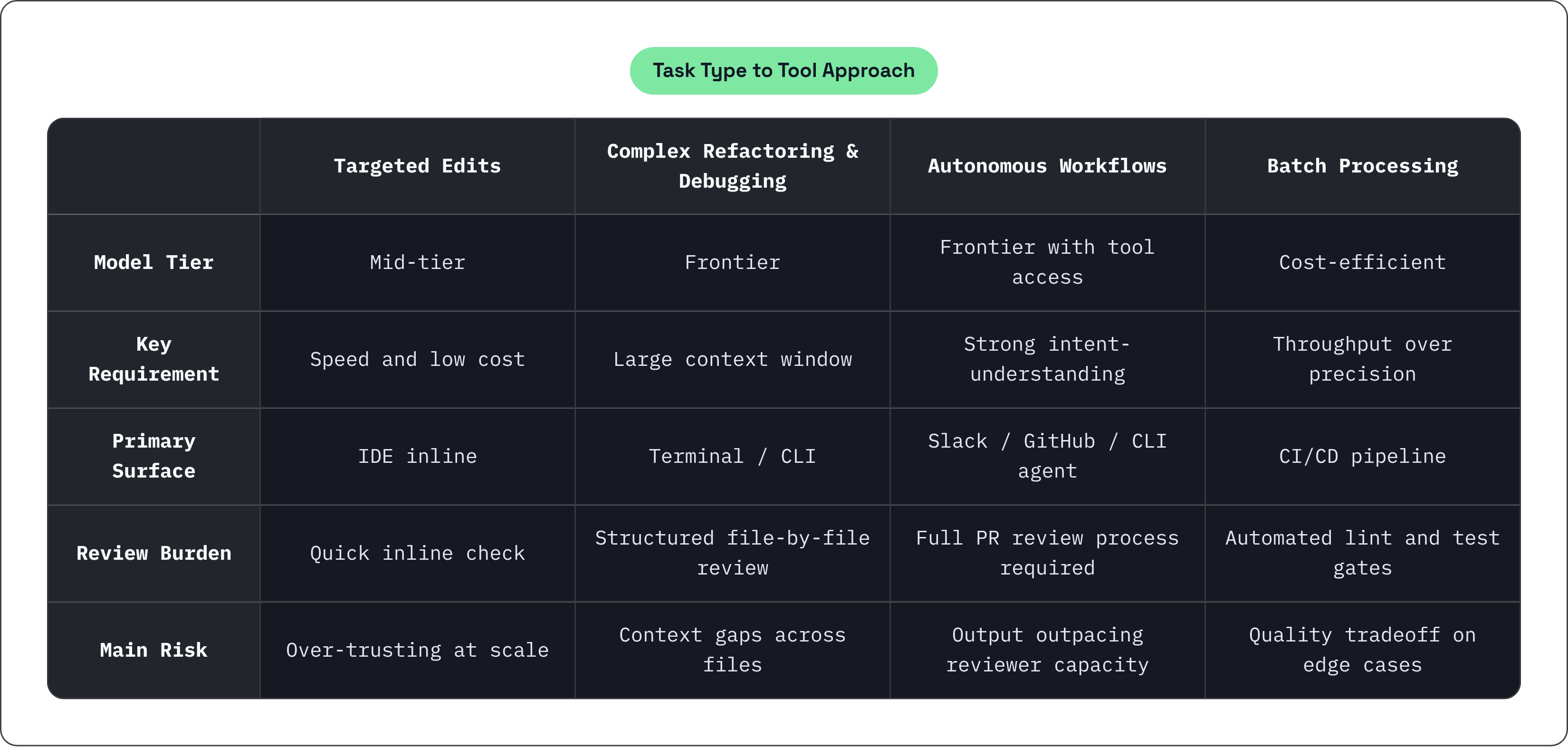
The task-to-tool mapping that follows:
- Targeted edits and high-volume generation. Mid-tier models in the IDE. Optimize for speed and cost.
- Complex refactoring and large-codebase debugging. Frontier models with large context windows. Prioritize intent-understanding and context fidelity.
- Autonomous multi-step workflows. Agents with tool access (shell, test runner, PR creation). Design the review workflow before you deploy the agent.
- Batch processing at scale. High-volume routing to cost-efficient models. Accept a small quality tradeoff for throughput.
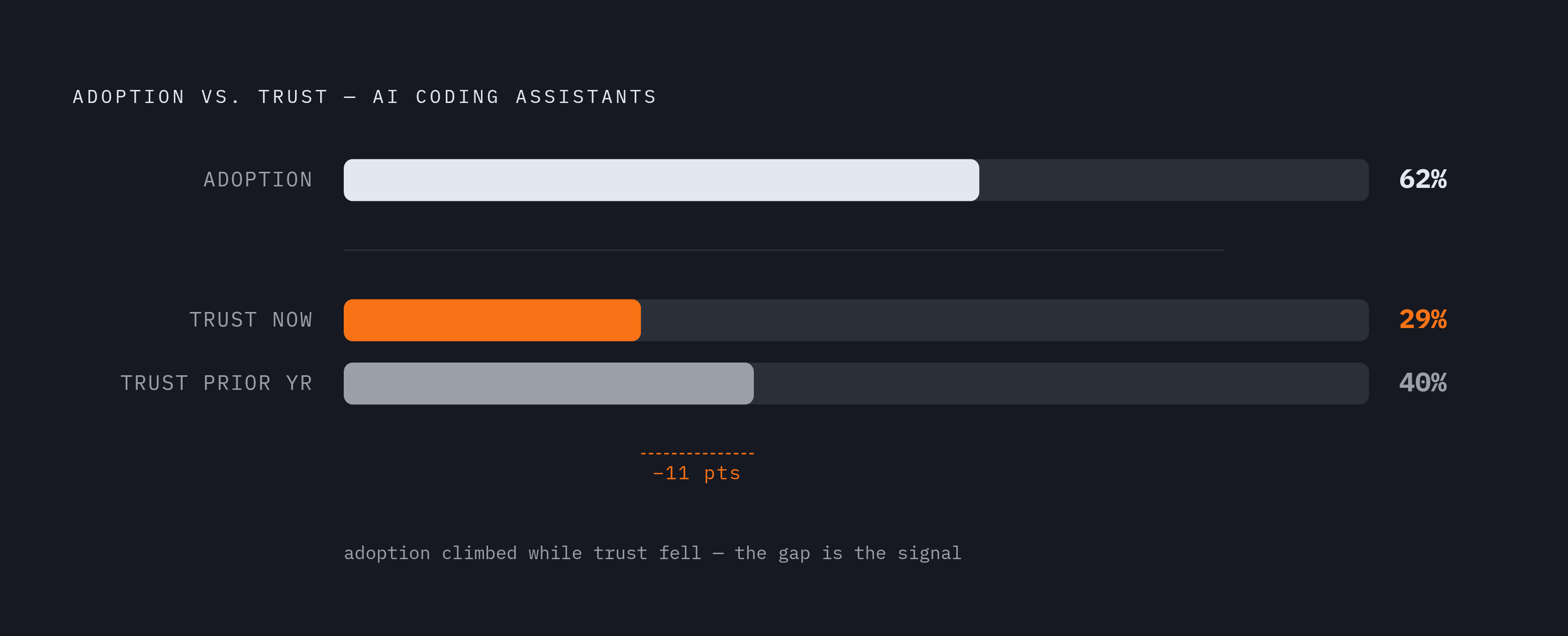
Around 62% of developers now rely on at least one AI coding assistant or agent. But only 29% say they actually trust the output — down from 40% the year before. Adoption going up while trust goes down is a signal worth paying attention to. Most of those bad experiences trace back to a mismatch: using an autonomous or generative tool on a task that needed targeted control, or vice versa.
The best developers running multiple AI tools aren't doing it because they're tool enthusiasts. They're doing it because the task spectrum is wide, and specialists win at their sweet spot. Matching the tool to the task, before you start, is the habit that separates the teams getting real value from the ones quietly losing trust in the whole category.