Cursor Coding Agent Compared to CLI-Based Agentic Tools
IDE agents see more context and act faster than CLI tools, changing what autonomous coding can do.
I've spent way too many hours this year watching agents work in both places, terminal and IDE, and I keep coming back to the same fork in the road. Agentic coding means handing the thing a goal instead of a prompt. It plans, edits files, runs commands, checks its own work, keeps going until it's done. That's not autocomplete. That's not a chatbot you copy-paste from. And once you're in that world, a question sneaks up on you that didn't used to matter: does it matter where this agent actually lives? Turns out yes. A lot more than I expected going in.
Quick history, because it explains why anyone cares. Tab autocomplete finishes your sentence. Chat agents answer a question and wait for you to paste the answer somewhere. Then you get to autonomous agents that chew on a problem for an hour without you watching every keystroke, and suddenly the question of where it sits stops being trivia. An agent running unsupervised for an hour needs to see a lot more than one finishing your sentence. And what it can see depends largely on its address.
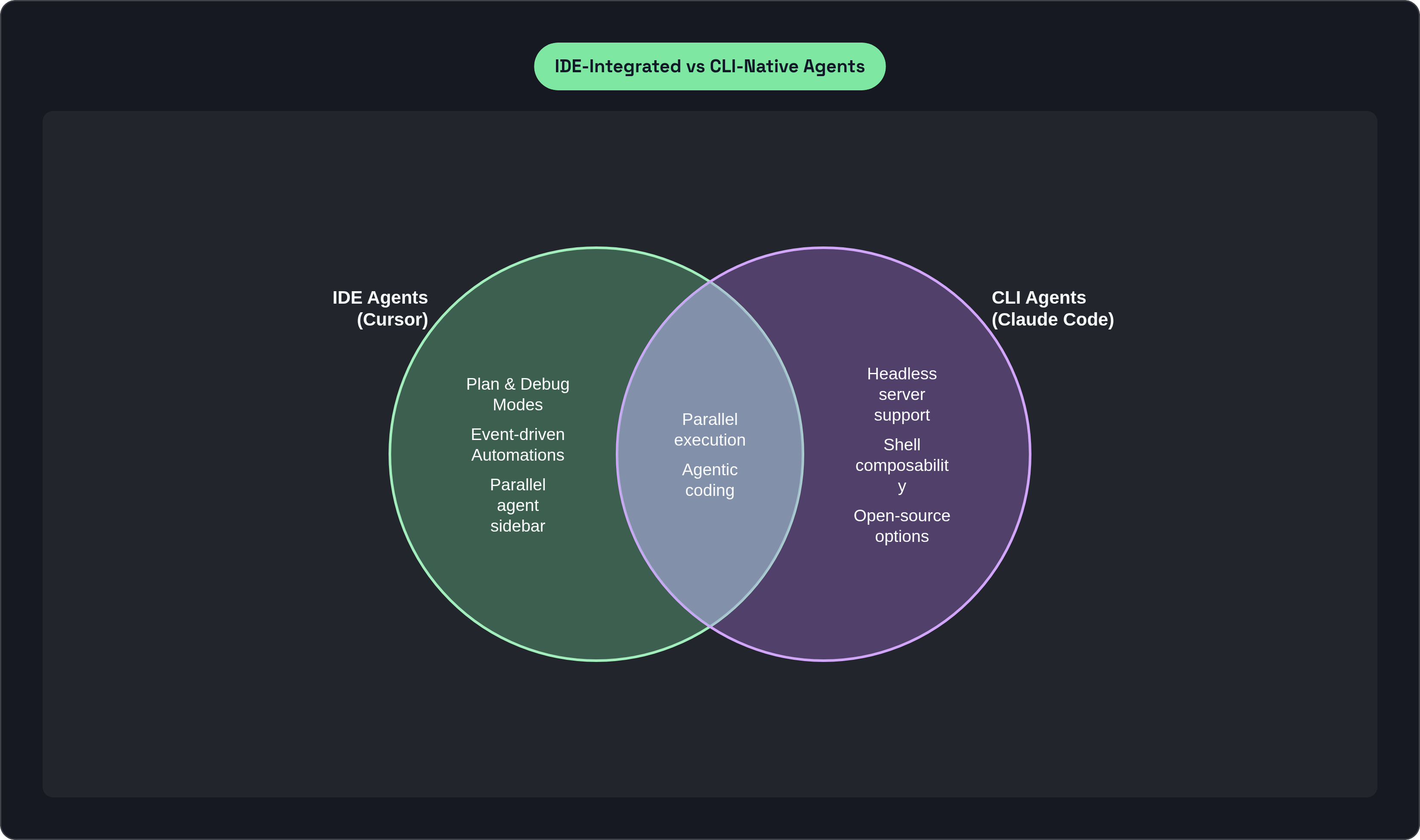
Two camps have formed around this. IDE-integrated agents sit inside your dev environment (editor, file tree, terminal, test runner, source control), all visible at once. CLI-native agents live in your shell, touch the filesystem through commands, and skip the visual interface entirely. Cursor is the flagship of the first camp. Claude Code leads the second. Both have grown fast: Cursor says agent usage is up more than 15x over the past year, and an April 2026 industry survey puts Claude Code at 18% developer market share. This isn't two obscure tools sniping at each other. It's two philosophies, and they produce notably different capabilities.
What the CLI-native tools actually offer and where they are strongest
The CLI-native world in mid-2026 is crowded. Claude Code from Anthropic, Antigravity CLI (Google's closed-source successor to Gemini CLI), OpenAI's Codex CLI, and open-source options like OpenCode. Claude Code is the one everyone else gets measured against.
It runs entirely in your shell. No separate app, no browser tab. It reads files, runs shell commands with your approval, and keeps iterating without much hand-holding. Late in 2025, Anthropic added multi-agent support (several sessions running in parallel, sharing a task list). Still an experimental preview as of mid-2026, but it tells you where they want to go. And developers seem to love this thing. That same survey put Claude Code at 46% "most-loved," ahead of everything else measured.
Why the love? A few real reasons:
- It runs anywhere a shell runs. Remote servers, CI pipelines, headless boxes. No IDE required, no IDE possible in a lot of these places.
- It composes. Drop it into a shell script, a Makefile, a CI job. No glue code needed.
- It's low-friction if you already live in the terminal. No new surface to learn, no window to switch to.
- Open source exists here. OpenCode has a large GitHub following, and self-hosting means your code never has to leave your own machines if that's a requirement for you.
Now the part that's less flattering. Google shut down Gemini CLI on June 18, 2026, gutted the free tier, and replaced it with a closed-source binary, Antigravity CLI. Anyone who'd built a workflow around Gemini CLI had to scramble. I don't read that as an indictment of CLI tools as a category. But it is a real reminder: when your agent is a standalone binary with no platform behind it, you're exposed to one company's roadmap in a very direct way. That's the trade.
There's also a structural ceiling here, not just a business-risk one. A CLI agent has no persistent view of your editor state, your diff, your test panel, your source control surface. It sees what you tell it, through commands and file reads. That's narrower than what you see sitting at your own desk. So what happens when the agent's window onto the problem is smaller than yours?
How IDE integration changes what an agent can perceive and act on
Cursor's answer, more or less: stop making the agent guess. It doesn't read a filesystem description from the outside. It works inside the same environment you do. Editor, terminal, test runner, file tree, source control, all live, all at once, no translation layer.
Before it writes anything, Cursor sends subagents out to explore the codebase in parallel, each one picking whatever model fits its slice of the job. So the starting point isn't a cold read of some files scraped together. It's the product of actually looking around first.
That groundwork feeds two modes worth knowing about.
Plan Mode. For the big stuff (architecture calls, major refactors), the agent studies the codebase, asks you clarifying questions, and writes a plan before touching a single line. You see it. You can edit it. Execution waits until you say go. It's the agent saying "here's my read on what you want, tell me where I'm wrong before I commit."
Debug Mode. You describe a bug. The agent forms a hypothesis, drops log lines where it thinks they'll help, and asks you to reproduce the issue while it watches those logs live. Then it checks its guess against what actually happened and proposes a fix. That loop needs live terminal access, inside the same environment where the code and the logs both sit. A CLI agent can approximate parts of this. The live, in-place watching is the part the IDE surface makes practically workable.
Cursor 2.0 added parallel execution too: up to eight agents on one prompt, each isolated with its own git worktree or remote machine so nobody steps on anyone else's files. And because they're all inside one IDE, you get a sidebar to watch all eight without touching a different window.
There's a model-routing piece as well. Subagents each grab whichever model suits their subtask, regardless of who built it. The orchestration handles that so you're not choosing manually every time.
Here's where this often bites in practice. A CLI agent hitting an unexpected test failure has to relay it through plain stdout text and hope that's enough signal to work with. An IDE-integrated agent watches the test runner panel directly and reacts, no relay required. Sounds small. Feels significant forty-five minutes into an unattended run.
Automations and event-driven agents: what becomes possible when the agent is wired into the whole stack
This is where the IDE argument really sharpens up. In March 2026, the IDE-integrated tool shipped Automations (agents triggered by events instead of by you opening a session). A commit lands. A Slack message posts. A PagerDuty page fires. A timer goes off.
That's a genuine shift in what the thing even is. It stops being a tool you reach for and starts being a process that's just running, most of the time, waiting.
Some concrete shapes this takes:
- Incident response. PagerDuty fires. The agent queries server logs over an MCP connection and starts diagnosing before an engineer has opened a laptop.
- Slack-triggered work. Someone posts in a channel. That message can kick off an agent that drafts a plan, starts implementation, or runs a test suite.
- Scheduled jobs. Nightly refactors, dependency sweeps, the maintenance nobody remembers to actually run.
The tool processes hundreds of automations per hour across its user base. Not a demo number. That's a sign this is already load-bearing for people, not a feature sitting unused in a settings menu.
Can CLI tools approximate this? Somewhat. Cron jobs and shell scripts get you scheduled or triggered behavior if you're willing to build it. But the agent itself has no memory of IDE state, no Slack hook at the agent layer, no single screen showing what's currently running. You're the one stitching it together, from outside the tool.
Which gets at something bigger: when an agent sits inside the places work actually happens (the IDE, the terminal, Slack, GitHub) event-driven autonomy is largely built in. When it only lives in the shell, that same autonomy depends on glue you have to build and then maintain yourself, for as long as you keep using it.
One more thing worth saying plainly: your attention doesn't scale the way automation does. Run a few dozen automations and you need one place to check on all of them, or you'll lose track. That's what the IDE sidebar is actually for. Not decoration. A direct answer to the fact that a person can only watch so many things.
Where CLI tools retain a genuine advantage: portability, composability, and open-source flexibility
None of the above means CLI tools lose this fight. They win outright in specific spots, and it's worth naming them straight.
Portability, full stop. A CLI agent runs on any machine with a shell. Headless servers, remote dev boxes, CI runners, places an IDE literally cannot go. If that's where your work happens, the whole IDE-integration argument mostly doesn't apply to you.
Composability, too. Claude Code and Codex CLI slot into existing shell workflows without friction. Pipe the output into a script, a Makefile, a deploy pipeline. Codex CLI's AGENTS.md setup (project config layered on top of global config) gives teams a light way to encode shared context without agreeing on a shared IDE.
Open source matters more than anything else on this list, for some teams. OpenCode, or Pi from Armin Ronacher, let you self-host, bring your own model keys, skip vendor lock-in entirely. If your org has strict data-residency rules, that's not a bonus feature. That's the entire decision, made before anyone opens a laptop.
And plainly: some people just work faster in a terminal. An IDE, however well built, is still a surface you have to navigate. For those developers a good CLI agent isn't a fallback. It's just the right tool.
DX's Q4 2025 numbers, covering more than 135,000 developers, put AI agent adoption among professional developers at 13.1%. A real chunk of that group is CLI-first, by choice, not because they haven't gotten around to trying something else. This isn't a phase people are passing through on the way to an IDE.
So: CLI wins when the environment can't run an IDE at all, when fitting into existing shell tooling matters more than one unified screen, or when open-source portability isn't negotiable.
How the integration depth question plays out differently for individual developers vs. engineering teams
Solo, this mostly comes down to habit. Where do you already spend your day?
- Bouncing constantly between editor and terminal? The IDE-integrated unified surface pays for itself. Plan Mode, Debug Mode, Automations, they all stack because they share the same context.
- Living in tmux, writing scripts, deploying to boxes somewhere else? Claude Code or Codex CLI is probably faster to reach for. Why bring in a surface you don't need?
For a team, the question stops being taste and starts being organizational.
Parallel agents across branches, using git worktree isolation, maps onto how teams actually work (multiple people, multiple workstreams, running at once). Automations tied to Slack and GitHub put the agent inside team communication, not just someone's personal coding session.
That's large organizations putting budget behind the IDE-integrated bet, at scale.
But the sharpest evidence I've seen on team-level payoff is a Microsoft field study on arXiv from July 2026. Tens of thousands of engineers, early-2026 rollout, and the ones who adopted AI coding tools merged substantially more pull requests per engineer per day. That lift held for the full four months of the study, with little visible decay. What I like about this number: it's not lines of code, a metric that's been gamed for years. It's merged pull requests, an actual workflow outcome. And that's exactly the kind of thing IDE integration, with live test panels and source control awareness built in, is designed to move.
CLI tools scale differently, and there's nothing wrong with that direction. They drop cleanly into a mixed shop where everyone uses a different editor and nobody's trying to standardize. That's a real kind of value. Just not the coordination kind.
Choosing between them: the questions that actually determine the right fit
So which do you pick? Forget "IDE or terminal" as the framing. Ask instead: where does most of the actual autonomous work need to happen, and what does that place need to show the agent for it to do the job well?
Toward the IDE-integrated tool, if:
- You need agents running in parallel across several workstreams, watched from one screen.
- You want agents that wake themselves up, on a Slack message, a GitHub event, a PagerDuty page, with nobody opening a session first.
- You want Debug Mode's live log watching, or Plan Mode's review step, sitting in the same place you already read and write code.
- Your team is big enough that a shared view into all these running agents actually saves you real coordination pain.
Toward a CLI-native tool, if:
- The agent has to run on a headless server or inside CI, somewhere no IDE will typically go.
- Fitting into shell scripts and Makefiles matters more to you than one visual home base.
- Your org's data rules push you toward self-hosted and open source, with few exceptions.
- Your engineers are already terminal-first and have little interest in changing that.
None of this is strictly either-or. Plenty of shops run the IDE-integrated tool for hands-on sessions and a CLI agent for the CI-integrated stuff that runs with nobody watching. These aren't rivals fighting over the same five minutes of your day. They're built for different five minutes.
Zoom out and the broader numbers back this up. Stack Overflow's 2025 survey, more than 49,000 developers, found 84% now use or plan to use AI coding tools. Only 29% actually trust the output. So whichever side you land on, IDE or CLI, that trust gap is yours to close, not the tool's. How you review its work, how much autonomy you actually give it, where you put a human checkpoint, that matters as much as which tool you picked.
One closing note: as the tasks you hand an agent get longer and more open-ended, the case for deeper integration gets stronger, not weaker. A longer task needs more context to stay on the rails, more feedback loops to catch its own mess, more of a surface for you to keep an eye on it. I don't think that's a strike against CLI tools. It's just where things lean once the work gets substantially harder.